

Last updated: November 19, 2026
Key Takeaways
- Missing those four features usually means slower security checks and more repacking at arrival.
- A work-ready carry-on usually combines front-pocket access, a 15-inch or 16-inch laptop sleeve, and separate space for office gear.
- Larger bags can work, but once you move toward checked-luggage size, carry-on convenience starts to fade.
- A hard-shell spinner is a strong choice for many business travelers because it protects electronics and keeps its shape with a blazer, cables, and a laptop.
A work trip gets messy fast when your bag won’t fit overhead, crushes your laptop, or turns security into a 10-minute scramble. In Business and Work-Ready Carry-On Features — The Complete Guide, I focus on the carry-on details that actually help on business trips: a 20-inch-class spinner with a padded laptop sleeve, a quick-access pocket, smooth zippers, and enough structure to keep a suit from folding into a mess. The sections below sort out which features matter, which ones are marketing fluff, and which trade-offs are worth accepting.
Our Top 3 Picks at a Glance
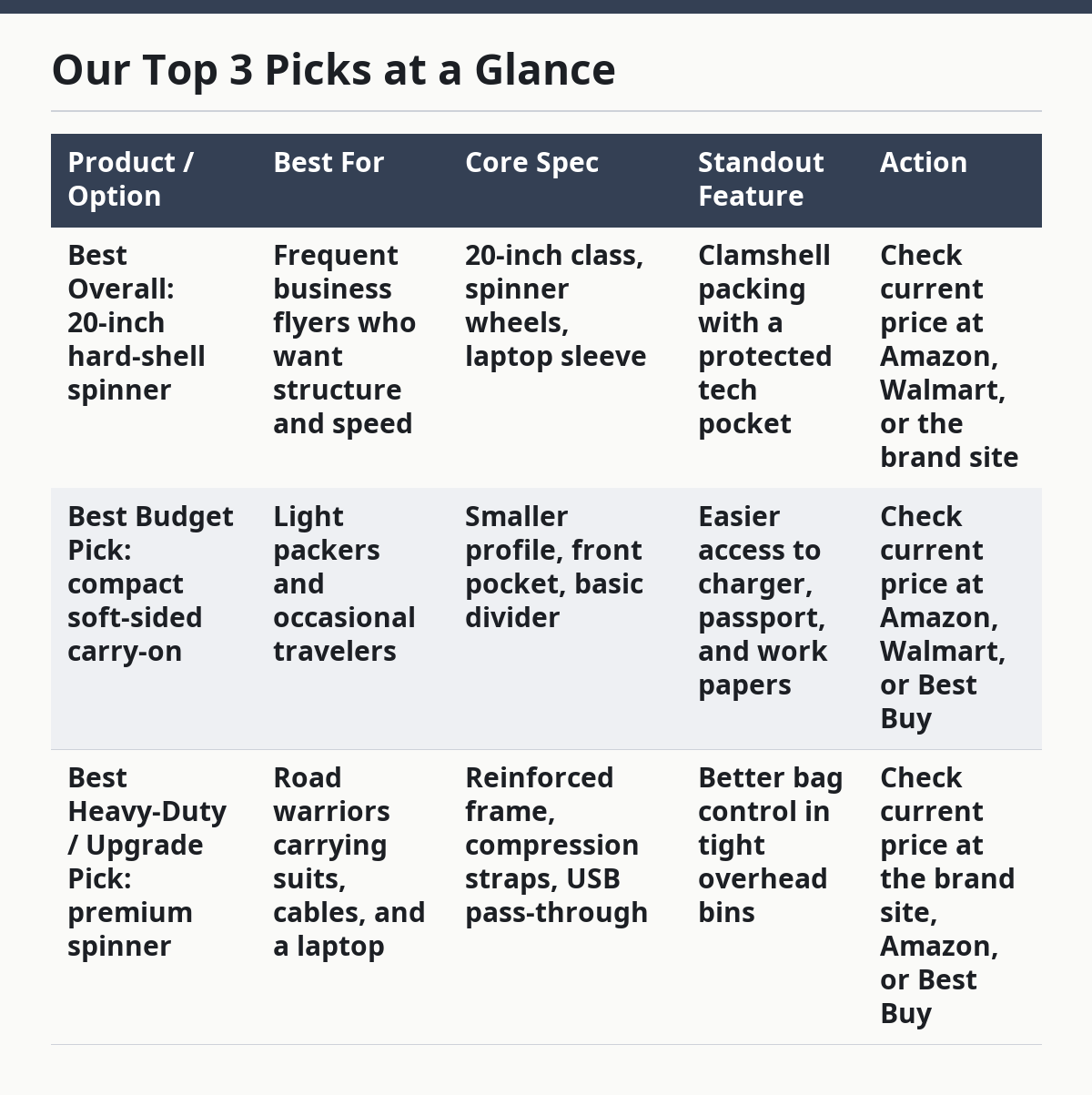
- #1 Best Overall: A 20-inch hard-shell spinner with a dedicated laptop compartment and a clamshell main opening
- #2 Best Budget Pick: A soft-sided underseat or compact carry-on with one front pocket and simple interior organization
- #3 Best Heavy-Duty / Upgrade Pick: A premium spinner with reinforced corners, compression straps, and a built-in USB pass-through
| Product / Option | Best For | Core Spec | Standout Feature | Action |
|---|---|---|---|---|
| Best Overall: 20-inch hard-shell spinner | Frequent business flyers who want structure and speed | 20-inch class, spinner wheels, laptop sleeve | Clamshell packing with a protected tech pocket | Check current price at Amazon, Walmart, or the brand site |
| Best Budget Pick: compact soft-sided carry-on | Light packers and occasional travelers | Smaller profile, front pocket, basic divider | Easier access to charger, passport, and work papers | Check current price at Amazon, Walmart, or Best Buy |
| Best Heavy-Duty / Upgrade Pick: premium spinner | Road warriors carrying suits, cables, and a laptop | Reinforced frame, compression straps, USB pass-through | Better bag control in tight overhead bins | Check current price at the brand site, Amazon, or Best Buy |
The short answer
For business travel, the winning carry-on feature set is simple: easy laptop access, a stable shell, smooth rolling, and one clean place for documents and cables. If a bag lacks those four pieces, it usually wastes time at security and on arrival.
What makes a carry-on work for business travel?
Picture this: you’re in a line that moves too fast, your laptop needs to come out, and your boarding pass is buried under socks. A work-ready carry-on fixes that with front-pocket access, a 15-inch or 16-inch laptop sleeve, and a layout that keeps office gear separate from clothes. The bag should help you move, not make you unpack in public.
The truth is, many “travel” bags are built for weekend clothes, not meetings. Business and Work-Ready Carry-On Features — The Complete Guide is really about a different mix: flat folders, charging bricks, a suit or blazer, and a laptop that you may need before you reach the gate. That is why a hard-sided spinner with internal compression often beats a floppy duffel.
What matters most is not just capacity. It’s packing order.
- Laptop and charger stay near the top or in a quick-access pocket
- Documents stay flat, not rolled around with shoes
- Clothing stays restrained by straps or a divider
- Wheels and handle survive repeated airport pavement and hotel carpet
A bag that does those four jobs well saves time every single trip.
Which carry-on size actually works for work trips?

A 20-inch carry-on is a practical starting point for business travel because it usually fits the overhead bin rules used by many airlines, while still leaving room for a laptop, a change of clothes, and toiletries. Bigger bags can work, but once you cross into larger checked-luggage territory, the whole point of carry-on convenience starts to disappear.
According to the U.S. Department of Transportation, baggage fees brought in about $7.3 billion for U.S. airlines in 2023, which is one reason avoiding checked bags still matters for frequent flyers. Travel + Leisure has also reported that many major U.S. carriers keep carry-on limits around 22 x 14 x 9 inches, though the exact rule still depends on the airline. The bag itself may be sold as “carry-on,” but the actual measurement matters more than the label.
The practical target is a bag that is easy to lift, easy to roll, and not so deep that it becomes a closet on wheels.
- Best range: 20-inch class for most business trips
- Good for longer stays: compact carry-ons with smart interior dividers
- Avoid if you fly often: oversized soft bags that bulge under pressure
- Check before buying: overhead bin limits for your usual airline
A bag that fits the plane and your work load wins. One that fits neither loses fast.
The laptop and document features that save time
Picture this: you’re at security with a laptop, tablet, charger, and a paper folder for a meeting. A business carry-on should let you reach the computer without emptying the whole bag, which means a dedicated laptop sleeve, a quick-open front pocket, and a lay-flat design are the real stars here.
The best layouts keep electronics separate from clothing so cords do not tangle with shirts or papers. A sleeve that accepts a 15-inch laptop is common; some bags handle a 16-inch device, but you need to check the exact internal size, not the marketing name. TSA also states that laptops must be screened separately unless the traveler qualifies for an approved screening lane, so quick access can save real time. A padded tablet pocket is useful too, especially if you read decks or sign forms on the move.
The features that matter most are easy to spot, and they beat flashy extras.
- Padded laptop sleeve: protects the machine and makes screening easier
- Quick-access pocket: holds passport, phone, earbuds, and boarding pass
- Flat document space: keeps a folder from bending
- Cable pouch: stops chargers from turning into a knot
A bag without these features can still travel. It just makes every checkpoint slower.
Hard shell or soft side: which one is better for work?
A hard-shell spinner wins for most business travelers because it protects electronics and keeps the bag’s shape when packed with a blazer, cables, and a laptop. A soft-sided bag wins when you need outer pockets and a little extra give, especially if you carry documents you want to reach without opening the whole case.
The choice is not about fashion. It’s about how you pack.
A hard shell handles rough handling better, and the interior divider helps stop clothes from sliding. The downside is obvious: fewer exterior pockets, so you may need to open the bag for items you’d rather grab on the move. A soft bag gives you that front-pocket access, but it can sag when packed unevenly and may not protect a laptop as well.
| Criteria | Hard-Shell Spinner | Soft-Sided Carry-On | Winner for this condition |
|---|---|---|---|
| Laptop protection | Better shell protection | Depends on padding | Hard-shell for electronics |
| Quick access | Usually limited | Often better front pockets | Soft-sided for frequent document grabs |
| Shape retention | Stays firm | Can bulge | Hard-shell for suits and folded clothes |
| Packing flexibility | Less forgiving | More forgiving | Soft-sided for awkward items |
| Wet-weather resistance | Better exterior wipe-down | Fabric can absorb moisture | Hard-shell in rain |
| Overstuffing | Less forgiving | More forgiving | Soft-sided if you pack loose layers |
| Security speed | Often better if lay-flat | Can be good, but varies | Hard-shell for clean screening |
| Exterior access | Minimal | Strong point | Soft-sided for road travel |
| Business polish | Clean, structured look | More casual | Hard-shell for client-facing trips |
A hard shell is the default pick for office travel. A soft bag only wins if you need pocket access more than structure.
What wheel and handle features matter most?
Picture this: you’re crossing a terminal with one hand on coffee and the other on a carry-on that keeps tipping. Good wheels and a stable handle matter because business travel is full of short, fast moves, not long leisurely walks. A 4-wheel spinner is usually the smoother choice for airports and hotel lobbies.
Spinners roll beside you with less wrist strain. That matters when your bag carries a laptop and office gear, because weight adds up quickly. A telescoping handle should lock firmly and not wobble. If it flexes too much, the bag feels cheap even when the shell is solid.
Wheel quality changes the whole trip.
- Spinner wheels: easier in crowded terminals
- Two-wheel rollers: better on rough sidewalks and curbs
- Rigid handle: less wobble, better control
- Reinforced wheel housing: better for repeated flights
The trade-off is simple. Spinners are best indoors and on smooth ground. Two-wheel bags can feel steadier outside but are less convenient in a narrow aisle.
Zippers, locks, and shell details that get overlooked
A business carry-on can fail at the smallest point: the zipper pull, the handle latch, or the shell edge. That’s why the zipper track, lock compatibility, and corner reinforcement matter more than most buyers think. If any one of those parts feels flimsy, the bag may age badly.
The best carry-ons use smooth, easy-pull zippers that do not snag on the lining. Many premium bags include TSA-friendly lock points, though the lock itself may be sold separately. A hard shell with reinforced corners holds up better against the scrape and bump life of airport travel.
Here’s what to inspect before buying:
- Zipper quality: should glide without catching
- Lock points: useful if you leave a bag in a hotel room
- Corner reinforcement: helps against belt and bin wear
- Shell finish: matte surfaces hide scuffs better than shiny ones
A bag with weak zippers can be a headache on trip two. That is not a small flaw.
What storage layout works best for suits, cables, and papers?
A clamshell layout with internal straps is the most useful setup for business travelers because it divides the bag into a clean clothing side and a tech side. That structure makes it easier to pack a shirt, a blazer, or a tie without crushing it under heavier items. A messy one-compartment bag wastes space fast.
Because that clean division matters, the layout should match your work habits. If you carry a laptop, charger, mouse, notebook, and one change of clothes, you need separation more than raw volume. If you also carry shoes or a garment bag, the interior must stay organized or everything ends up blended together.
A smart interior usually includes these pieces:
- Cross straps: hold clothes in place
- Divider panel: separates clean items from electronics
- Zipper mesh pocket: keeps small items visible
- Flat sleeve: useful for papers or a thin folder
The weak point? Too many tiny pockets can become clutter traps. A bag with three good spaces is better than one with ten awkward ones.
Which features are worth paying for, and which are fluff?
Picture this: you’re staring at two bags that look similar, but one has a built-in USB port, extra pockets, and a fancy lining. The real question is whether those extras solve a problem you actually have. For most business travelers, USB pass-through, a garment panel, and a solid laptop sleeve are useful; color-changing trim and odd-shaped compartments are not.
The USB port sounds clever, but the bag still needs a power bank inside, so the feature is mainly convenience, not magic. A garment panel can help a suit arrive in better shape, but it won’t replace a proper garment bag for formal wear. Anti-theft zippers and hidden pockets may matter on crowded transit days, though they add complexity and can slow access. If you are unsure whether a feature is worth the extra cost, check a travel advisor, the airline’s baggage guidance, or a product review from a source like Wirecutter before paying for it.
Use this filter:
- Buy the feature if it saves time at security or protects a laptop
- Skip it if it adds weight without changing how you pack
- Treat flashy extras as bonus points, not the reason to buy
- Focus on the shell, wheels, handle, and interior first
A carry-on is work gear. It should make your trip easier, not impress people who will never carry it.
The honest verdict: which kind of business carry-on should you choose?
Choose a hard-shell 20-inch spinner if you fly often, carry a laptop, and want clean packing with less stress at security. Choose a soft-sided compact carry-on if you live in the quick-access pocket and need to reach documents or chargers without opening the whole bag. Neither works well if you constantly overpack or need to carry a full formal wardrobe.
The right pick comes down to how you travel, not how the bag looks in a product photo. If your trips are mostly flights, meetings, and hotel rooms, structure wins. If your travel is mostly car, train, and conference floor, pocket access can matter more.
A simple rule helps:
- Pick structure for flying and client work
- Pick pockets for road travel and short hops
- Skip carry-on-only packing if you need multiple shoes, heavy samples, or full suits for several days
The carry-on that works best is the one that disappears into the trip. It rolls well, keeps your laptop safe, and doesn’t waste your time.
When the usual carry-on advice breaks down
Picture this: you’re packing for a four-day trip, but one day includes a presentation, one includes dinner, and one includes a long train ride. The standard advice changes when your trip has special gear, because odd items, long stays, and wet weather can flip the best choice.
There are real exception cases where a soft bag or even a different format wins.
- If you carry a suit every trip: a garment-focused bag may beat a standard spinner
- If you work on trains or in cars more than planes: a soft-sided bag with outer pockets can be more practical
- If you bring equipment samples or bulky media gear: a larger checked case may be the right tool
- If you need ultra-fast access to papers all day: an underseat business bag can outperform a full carry-on
The catch is that these exceptions usually solve one problem by creating another. A garment bag protects clothing but can be awkward through airports. An underseat bag is easier to reach, but it often sacrifices clothing space. Know which problem matters most.
What to check before you buy
A carry-on is work-ready only if the details match your routine. Before you buy, check the listed dimensions, laptop sleeve size, wheel type, and interior layout. If those four do not fit your travel style, the rest of the marketing won’t help.
Use this quick filter:
- Does the bag fit your usual airline’s carry-on limits?
- Does the laptop sleeve fit your actual device size?
- Are the wheels spinner-style or two-wheel?
- Is there a pocket for passport, phone, and charger?
- Will the interior hold a shirt or blazer without crushing it?
If the answer to any of those is no, keep looking. A decent-looking bag with the wrong layout becomes dead weight after the first trip.
Questions business travelers ask most often
What is the single most useful feature in a work carry-on?
A dedicated laptop compartment is the most useful feature because it saves time at security and protects your computer from being crushed by clothing or shoes. A well-placed front pocket comes next, especially if you travel with boarding passes, cables, or a notebook.
Is a hard shell better than soft sides for business travel?
A hard shell is usually better if you fly often and carry electronics because it holds shape and offers better impact protection. A soft-sided bag is better if you need easy outer-pocket access and a little extra packing flexibility.
Do I really need spinner wheels?
Yes, if you move through airports, hotel lobbies, and smooth terminals often. Spinner wheels reduce wrist strain and make the bag easier to steer in tight spaces, while two-wheel bags can work better on rough sidewalks.
How big should a business carry-on be?
A 20-inch carry-on is the safest all-around size for business travel. It usually gives enough room for a laptop, charger, toiletries, and one or two changes of clothes without turning into checked-bag territory.
Are USB charging ports worth it?
USB ports are convenient, but they are not a must-have. They only help if you already carry a power bank inside the bag, so they solve convenience, not battery life.
Drafted with AI; not yet reviewed by a person.




Leave a Reply